

Sample Handbook
See the Reports…Understand the Value! The default reports are visualizations of your yield data and projections based on how your fields are harvested. Check each report below to learn about specific features and find out how you can adjust the results to more closely match your operation. You can also find any frequently asked questions specific to each individual report.
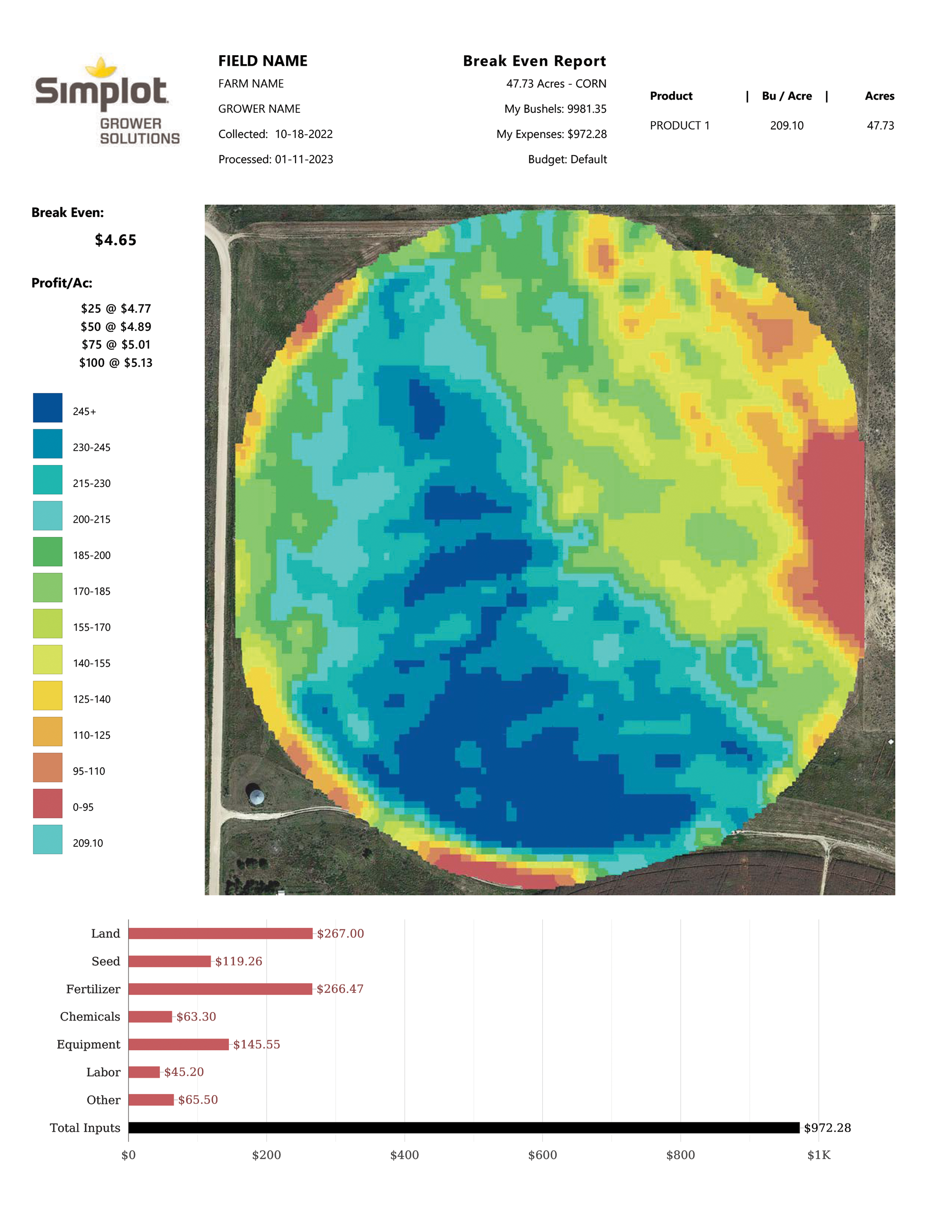
Break Even Report
This report enables the grower to engage in informed marketing decisions based on their actual production. By utilizing this report, a grower can also engage in candid negotiations with current landlords as well as potential landlords. They will be able to identify areas within a field that they need to focus on to increase their productivity.
Editing the Report
Break Even Report: Settings such as the input costs at the bottom are driven by default data. Your input costs are probably different so you should complete a budget form for the year of the data after it has been processed.
The first step is always to Log in to your account – Menu navigation
Data has not been uploaded
- Select Acusync upload/download
- Select your raw yield monitor data (we do not currently accept shapefiles, please contact your advisor for
assistance) - Drag or copy the raw yield files into the “Upload” folder. These files must be unzipped and placed
directly inside the “Upload” folder.
Data has already been uploaded
- Select Budgets
- Select Create Budget
- Select the current year for budget
- Follow the form to input selling cost, seed, land, chemical, fertilizer, other expenses and income.
Frequently Asked Questions
Where do the default values for the inputs originate?
Default values are derived from Midwest University averages. The default values aide in giving an indication of break-even values but to maximize the report it is best to enter your own values.
How can I populate my actual input values?
You can input your actual values by logging into your account and selecting, budgets, then create a budget. Select the year you would like to create a budget for any historical data. For more details on creating projected budgets please see the instructions contained within your account.
Is harvested grain moisture used in my break even calculations?
The grain moisture utilized in your report is for dried standard market bushels. For corn this is 15.5% and for soybeans this is 13%. To calculate your drying expense you may enter these in the other category on the budget form to account for these actual costs.
Will these reports be available for all my fields?
These reports will be available for all fields that have been submitted within the “Uploads” folder. If the data contains erroneous yield monitor data, your SmartFarm team can clean the data and reload your information.
Is there someone I can talk to with questions about this report and how to use it?
Please contact your local Simplot Grower Solutions Crop Advisor or SmartFarm Advisor for any questions you may have on successfully utilizing these reports.
Profitability Report
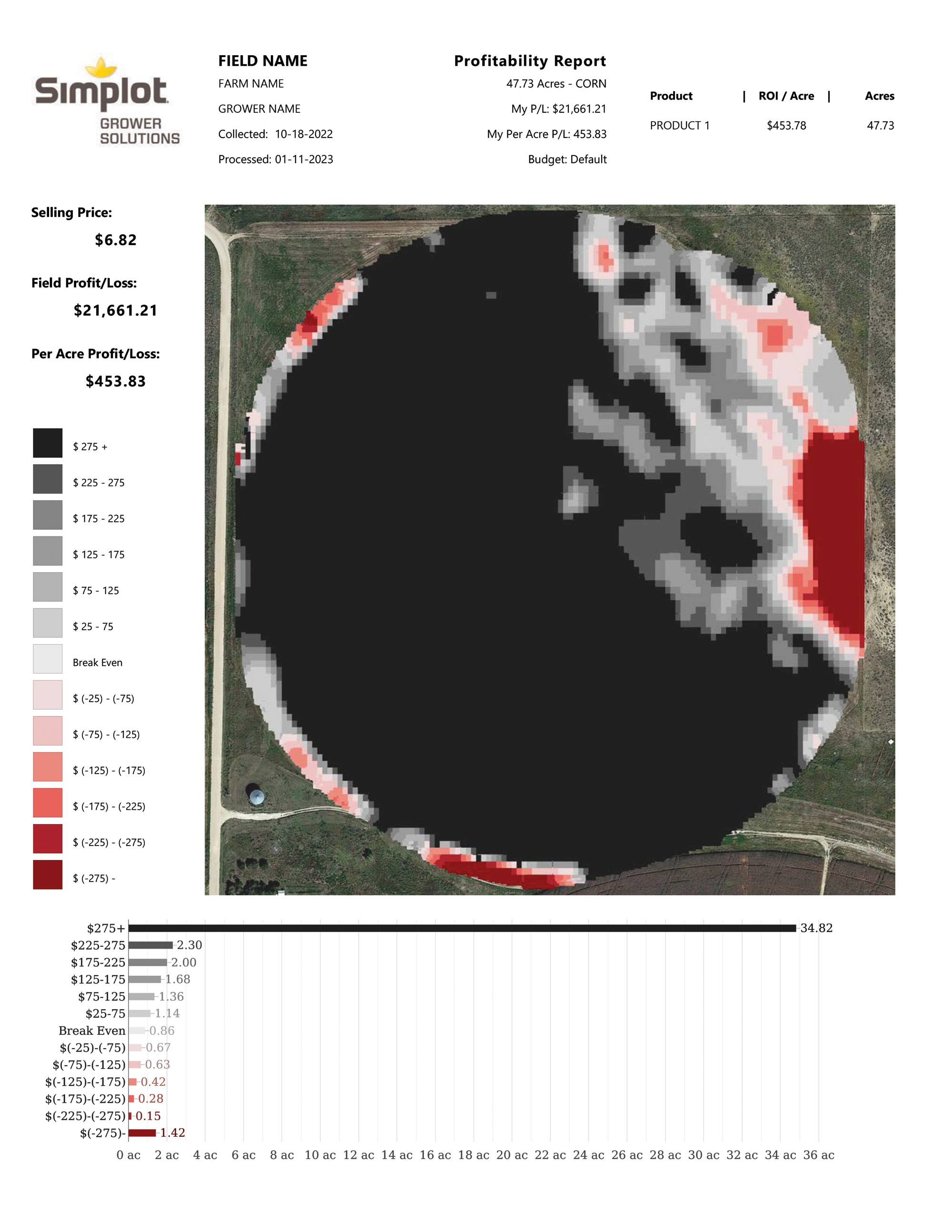
This report will help a grower identify problem areas in the field as well as areas they should work to emulate. By updating the inputs with their actual costs, a grower will be able to better understand the importance of managing their costs based on their actual production variability within the field. By being able to visualize the variety of profitability zones, a grower can determine if there are areas where being profitable has a small percent change, thus leading them to find ways to minimize inputs in those areas and reducing future losses.
Editing the Report
Profitability Report: Settings such as the selling price on the left are driven by a daily CBOT value. Your selling price is probably different so you should complete a budget form for the year of the data after it has been processed.
The first step is always to Log in to your account – Menu navigation
Data has not been uploaded
- Select Acusync upload/download
- Select your raw yield monitor data (we do not currently accept shapefiles, please contact your advisor for
assistance) - Drag or copy the raw yield files into the “Upload” folder. These files must be unzipped and placed
directly inside the “Upload” folder.
Data has already been uploaded
- Select Budgets
- Select Create Budget
- Select the current year for budget
- Follow the form to input selling cost, seed, land, chemical, fertilizer, other expenses and income.
Frequently Asked Questions
How do I input my actual selling prices?
To input your selling prices, log into your account and select Budgets, then create budget. Select the year you would like to create a budget for and the first page of the form will contain the selling price for currently supported crops.
Is the goal to turn the entire map black?
The goal isn’t necessarily to turn your entire map black, although that is the ideal scenario, the goal should be realistic and attainable. That means the goal should be to minimize input expenses and maximize output. Sometimes we are over spending in areas that are under performing, such as too much seed and in other areas we aren’t spending enough such as too little nitrogen. Our goal for you is to optimize your inputs for maximum output and profitability. Reduce your break even costs so marketing becomes easier and place inputs exactly where they are needed to maximize return.
Will my data be used to update this map with my actual production?
Your actual production can be utilized if you connect with your local Simplot Grower Solutions Crop Advisor. They will connect you with your local Smartfarm advisor and from there any data that needs edited or manipulated can be used.
Is there a support system in place to help me utilize resources to learn how to be more profitable?
Learning how to be more profitable is the big idea. We have a team of local people dedicated to helping you do that. It starts here with some of the simple things. Like what should I be planting and how thick should I be planting it. We want to start simple, so that you can start seeing the benefits and start maximizing profitability.
Seed Rate Report
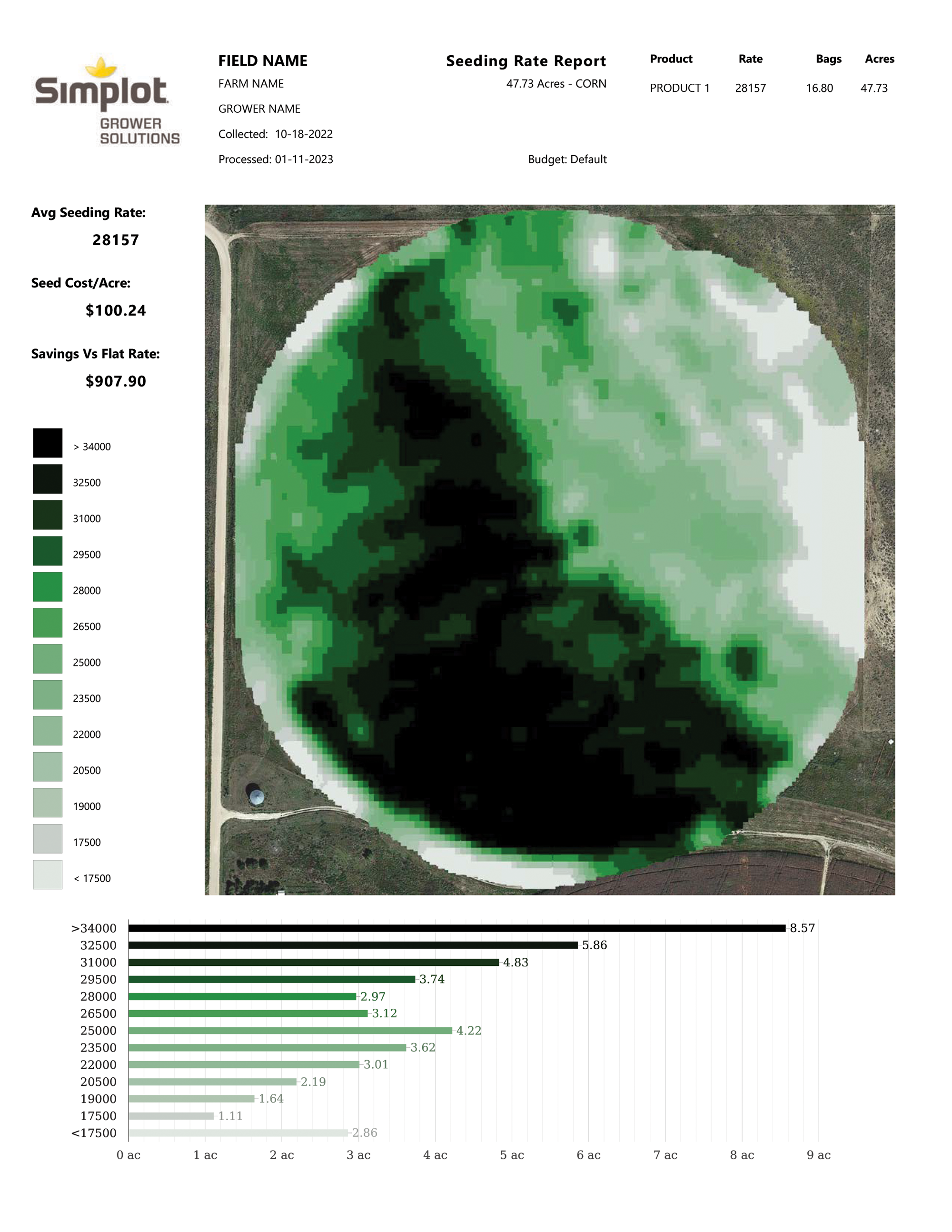
This report will help a grower plan for the appropriate seeding needs for each field. It will depict which areas of the field will require more or less seed to maximize profits. By being able to visualize this ahead of planting, a grower can determine if they feel this aligns with their historical production experiences. This report will reassure the grower that there is real value in seeding scripts by showing them flat rate seeding vs scripted seeding plans and the comparative costs for same.
Editing the Report
Seed Rate Report: Settings such as the average seed rate are taken from default values. These are likely different than your actual seed rate so you should complete a Crop Planner form to edit those values. This report represents the values calculated off that form
The first step is always to Log in to your account – Menu navigation
Data has not been uploaded
- Select Acusync upload/download
- Select your raw yield monitor data (we do not currently accept shapefiles, please contact your advisor for
assistance) - Drag or copy the raw yield files into the “Upload” folder. These files must be unzipped and placed
directly inside the “Upload” folder.
Data has already been uploaded
- Select Simplot Tools
- Select Crop Planner
- Input the Grower information, select the fields, place products.
- Choose what products to order for the selected field
- Select Order Handbook. You will receive Break-even, Profitability, Seeding Optimization and Spray records for the selected fields. Prescriptions will be contained within the grower folder in your
Acusync account under prescriptions
- Select Order Prescriptions. Prescriptions will be contained within the grower folder in your Acusync account under prescriptions. A seeding book will be created with just the seeding optimization reports.
Frequently Asked Questions
Does the hybrid I use affect the seeding optimization scripts?
In our research the hybrid has very little influence compared to the carrying capacity of the soil. This means that the soils water holding capacity and nutrient availability should drive seed recommendations before product specific recommendations. Your local crop advisor can help fine tune the details on any product specific information.
What is the highest and lowest populations the script will encompass?
The default values are based on the yield contained within your field. Utilizing our proprietary algorithms we determine the optimum seeding rate from the “benchmark year”. The benchmark year is the best year you have experienced for that field. However, you and your crop advisor can change the high and low populations to fit your own experiences.
Has this methodology been previously tested?
This methodology has been used on over a million acres in the midwest, plains and southeastern united states. It has consistently produced successful outcomes for hundreds of growers by saving them seed and maximizing profitability.
Is it possible I won’t save any money or seed on a given field?
While this is a rare occurrence, it is possible that you won’t save any money on a given field, This occurs if the field is extremely uniform where flat rate seeding may be the best recommendation or if the system detects that perhaps the field has been underseeded.
How many years of data do I need to create a seeding optimization Rx?
Our system requires a minimum of one year of data. This should be your best year of data, with the best yields. However to match most cropping rotations or for variability within fields we allow up to two years of data to be processed to create the best seeding recommendations.
Spray Record Report
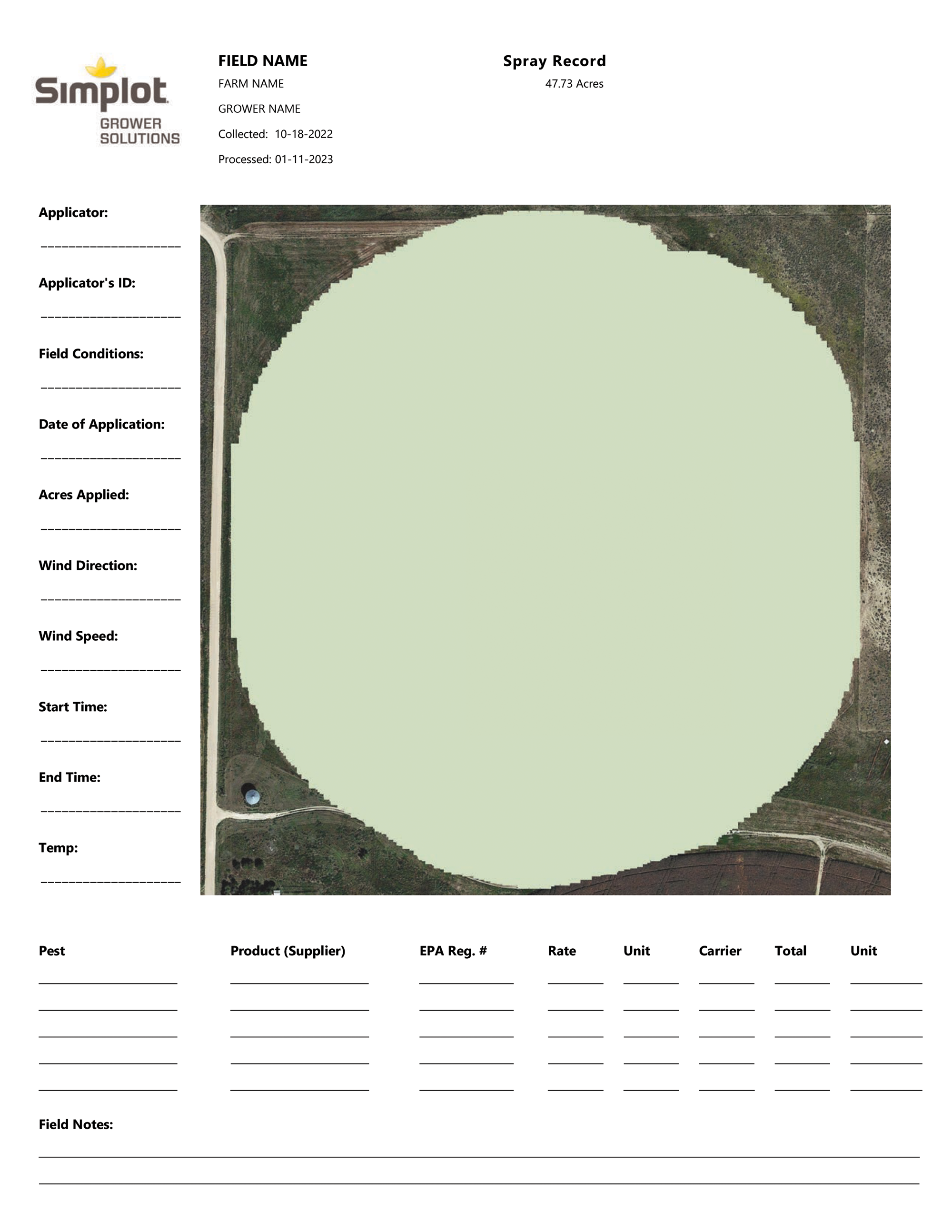
This report will assist the operation to ensure accuracy at the time of application. The sprayer operator, tender truck operator, warehouse manager and chemical supplier could all utilize their own copies to keep checks and balances before, during, and after applications. This can be used to rectify any digital tracking system to ensure accuracy and for billing purposes. This can also be used as supporting evidence in compliance related instances.
Editing the Report
Spray Record Report: The spray record is not an editable report currently and is designed to be filled out by hand. Future iterations will allow digital editing of the values in the fields for record keeping in addition to your physical paper copy.
The first step is always to Log in to your account – Menu navigation
Data has not been uploaded
- Select Acusync upload/download
- Select your raw yield monitor data (we do not currently accept shapefiles, please contact your advisor for
assistance) - Drag or copy the raw yield files into the “Upload” folder. These files must be unzipped and placed
directly inside the “Upload” folder.
Data has already been uploaded
- Select Simplot Tools
- Select Crop Planner
- Input the Grower information, select the fields, place products.
- Choose what products to order for the selected field
- Select order handbook. You will receive Break-even, Profitability, Seeding Optimization and Spray records for the selected fields. Prescriptions will be contained within the grower folder in your
Acusync account under prescriptions
- Select Order Spray Book. This will deliver a book with only spray records for the grower to utilizer.
Frequently Asked Questions
How many reports can I print for each field?
The spray record can be printed as many times as is needed. We also offer the ability to have a spray book created for your operation and your crop advisor can help order and put together. This spray book contains 4 identical spray records per field that will allow you to record pre emergent, post emergent, foliar and fungicide applications.
How do I enter data on the spray record?
Currently data is hand written. This provides values to operations with multiple machines or to create a checks and balance system for digital records. This also provides a completed compliance report to have in the cab of the machine if an audit would ever occur in the field.
Is this automatically updated with my crop protection recommendations?
Currently the spray record does not come populated with your crop protection recommendations but in the future that feature will become available.
Overall System FAQs – Frequently Asked Questions
YOUR DATA
Where does my data go?
Your data goes to cloud servers protected by Amazon Web Services. Our system then accesses that encrypted data” decouples from the internet” and processes the information. Your reports are then made accessible to your by Amazon Web Services servers via your password protected account.
How do I know my data is kept private?
Our user agreement specifies that your data is your data. We may use aggregated data so that we can better interpret product performance and enhance our system. You specify who gains access to your information, what crop advisor you would like to work with and who your SmartFarm contact is. Your data is your data our goal is to turn it into meaningful information that can help you be more profitable.
Who has access to my data?
The only people that have access to your data are the people you choose to allow access. We can only access your account if you give us permission to do so.
How do I upload my data?
Uploading your data is simple. Your local Simplot Grower Solutions Crop Advisor or SmartFarm team is here to assist. They can help you create your account and get started transferring data.
SIMPLIFIED MANAGEMENT
How is this different than my current system?
This system is designed to be different because it doesn’t focus on one aspect such as agronomy of economics. They are combined into one system of logic that will help you maximize profits. This system is designed to be simple, so you don’t need to spend hours learning how to get insightful information. It’s literally as simple as dragging your data into a folder to get started.
How many years of data do I need?
We only ask for 1 year of data your best corn year on the fields you would like to optimize seeding rate on but
you can load as many years of data as you like to see profitability trends, break evens, etc.
Why do we only want 1 year of data?
We only ask for 1 year of data because we believe that 1 year of information, your best year, should be how we derive seeding recommendations. You can upload 2 years to ensure you have a good representation and match crop rotations. lf we average multiple years of data we run the risk of staying average.
How long does it take me to create my prescriptions?
Your time commitment is only a few minutes. Once the data is loaded” which can take less than a minute up to several minutes depending on file size and internet speed you should start seeing prescriptive reports within 24 – 48 hours. No more sitting in front of the computer for hours trying to get your data done.
What type of support will I need?
You may need assistance downloading from your display, uploading data into the system, accessing reports,
downloading prescriptions and loading prescriptions, but your local Simplot Grower Solutions team is here to assist you as well as operating guides
and videos for each display from start to finish.
MAXIMIZE PROFITS
What features will help me maximize profits?
The adage a picture is worth a thousand words is something we truly believe. We deliver standardized reports so you can see where you are profitable and where you aren’t. Give you clues and help unlock opportunities by optimizing inputs so they deliver maximum return on investment.
How do you derive your prescriptions?
Our prescriptions use a proprietary series of calculations to determine the optimized ROl for your fields. Every field will have a different average seeding rate, but they will all attempt to achieve the same ROl on every seed.